WhatSupper


August 2023
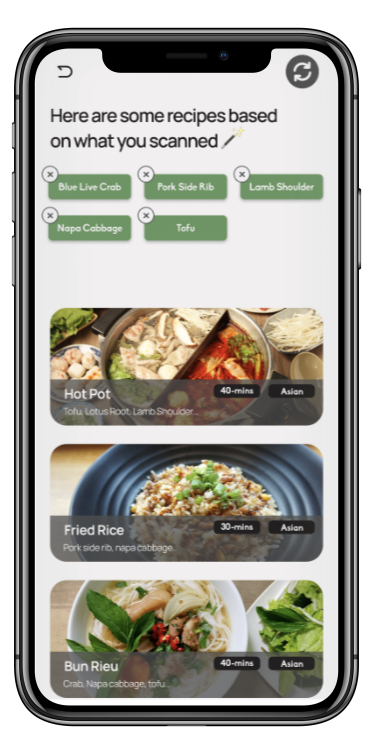
Presenting an app is created with Expo and utilizes OpenAI and OCR (Optical Character Recognition) technologies that offers AI-powered recipe generation from flyers, facilitates effortless meal planning, and provides the option to save and view others' cost-efficient recipe creations. This application saves both costs and time for individuals on a budget and tight schedules.
Role
As a front-end developer, my main responsibility is to integrate the camera functionality I've developed into our Expo app, collaborating closely with another front-end developer. Together, we ensure seamless integration of the camera, enabling it to capture images and convert them to base64 for optical character recognition (OCR) processing. This OCR capability identifies ingredients, which are then used by OpenAI to suggest recipes. Our combined efforts aim to deliver a user-friendly design and a polished app interface.
The Goal
In this project, we converted a photo into text using OCR, then extracted ingredients from the text using OpenAI, and finally generated a recipe with OpenAI's assistance.
State Management Essentials
1
2
3
4
5
6
7
8
9
10
11
12
13
14
15
// State variables for managing component state
const [isVisible, setIsVisible] = useState(false); // Indicates whether to display the captured image
const [uri, setURI] = useState(null); // Stores the URI of the captured image
const [pre, setPre] = useState(null); // Placeholder for an additional state variable, if needed
const [aiResponse, setAiResponse] = useState(null); // Placeholder for storing AI response, if applicable
const [aiIngredients, setAiIngredients] = useState(null); // Placeholder for storing AI-detected ingredients
const [croppedImage, setCroppedImage] = useState(null); // Stores the base64 data of the cropped image
const [isLoading, setIsLoading] = useState(false); // Indicates whether a process is in progress

// Reference to the camera component
const cameraRef = useRef();

// Hook to request camera permissions
const [permission, requestPermission] = Camera.useCameraPermissions();
These state variables manage various aspects of the component's state, such as the visibility of the captured image, the URI of the image, AI responses, cropped image data, loading status, and camera permissions.
The useRef() hook is used to create a reference to the camera component, and Camera.useCameraPermissions() hook is used to request camera permissions.
Camera Functionality (takePicture)
1
2
3
4
5
6
7
8
9
10
11
12
13
14
15
16
17
18
19
const takePicture = async () => {
    try {
        // Check if the camera reference exists
        if (cameraRef.current) {
            // Capture a photo asynchronously
            const photo = await cameraRef.current.takePictureAsync();
            // Set the URI of the taken photo to a state variable
            setURI(photo.uri);
            // Set the state variable to make the captured image visible
            setIsVisible(true);
            // Log the URI of the captured photo
            console.log('Picture taken:', photo.uri);
        }
    } catch (error) {
        // Log any errors that occur during the picture-taking process
        console.error('Error taking picture:', error.message);
        throw error;
    }
};
This function handles taking a picture using the device's camera. It captures a photo using the camera reference (cameraRef) and sets the URI of the taken photo to a state variable (uri). Additionally, it sets another state variable (isVisible) to true to display the captured image.
Handling OCR Process (handleOCR)
1
2
3
4
5
6
7
8
9
10
11
12
13
14
15
16
17
18
19
20
21
22
23
24
25
26
27
28
29
30
31
async function ocrSpace(input, options = {}) {
    try {
        // Check if the input data is valid
        if (!input || typeof input !== 'string') {
            throw Error('Invalid input provided for OCR');
        }

        // Extract required options for making the API request
        const { apiKey, ocrUrl } = options;

        // Create a FormData object with the image data
        const formData = new FormData();
        formData.append('base64Image', 'data: image/png;base64,{input}');
        // Append other optional parameters to the form data

        // Send a POST request to the OCR API
        const response = await axios.post(ocrUrl, formData, {
            headers: {
                'Content-Type': 'multipart/form-data',
                'apikey': apiKey,
            },
        });

        // Return the recognized text from the API response
        return response.data;
    } catch (error) {
        // Log any errors that occur during the OCR process
        console.error('Error during OCR:', error.message);
        throw error; // Re-throwing the error for higher-level handling
    }
}
This function handles the OCR (Optical Character Recognition) process, which extracts text from an image.
OCR is a technology that converts different types of documents, such as scanned paper documents, PDF files, or images captured by our camera, into editable and searchable data.
In this function, OCR is used to extract text from a captured image (represented as base64 data).
The extracted text is then used to fetch food ingredients, and the function navigates to a confirmation screen with the extracted ingredients.
Integration with OpenAI (fetchData)
1
2
3
4
5
6
7
8
9
10
11
12
13
14
15
16
17
18
19
20
21
22
23
const fetchData = async (ocrResponse) => {
    try {
        // Send a request to a specific website
        const ingResponse = await axios.post(
            'https://lsswwzyavgt7egwvij52d2qkai0rseod.lambda-url.ca-central-1.on.aws/', // The website's address
            {
                // The question to ask the website
                question: `Create a list of food ingredients named 'ingredients' using the extracted ${ocrResponse}. Only include food names, ignore other details.`,
            }
        );

        // Get the list of food ingredients from the website's response
        const ingredients = ingResponse.data.choices[0].message.content;
        // Print the list of ingredients
        console.log("the ingredients", ingredients);
        // Return the list of ingredients
        return ingredients;

    } catch (error) {
        // If there's an error, print it
        console.error(error);
    }
};
This function fetches food ingredients from a provided web link using information obtained from OCR. It sends a request to the server with the OCR response and extracts the food ingredients from the response. The function logs the extracted ingredients for debugging purposes.
Challenges
- OCR Integration: Extracting text from images via an OCR API, including API requests, response processing, and error handling.
- OpenAI Integration: Generating recipes from OCR-extracted text, considering OpenAI's limitations and devising creative solutions for recipe relevance.
- Image Manipulation: Using Expo's ImageManipulator for tasks like cropping and resizing images before OCR processing, ensuring accuracy.
- Navigation Management: Handling transitions between app screens, like moving from camera capture to confirmation post-OCR processing.
Outcome
The WhatSupper project has achieved its goal of successfully combining app functionality with users' shopping and meal prep experiences. By scanning fliers, our AI suggests cost-efficient recipes based on listed ingredients, enhancing user satisfaction. In the future, we'll introduce a coupon page for added savings, staying true to our commitment to continual improvement and value for users.

