
Recyclonaut
January 2023
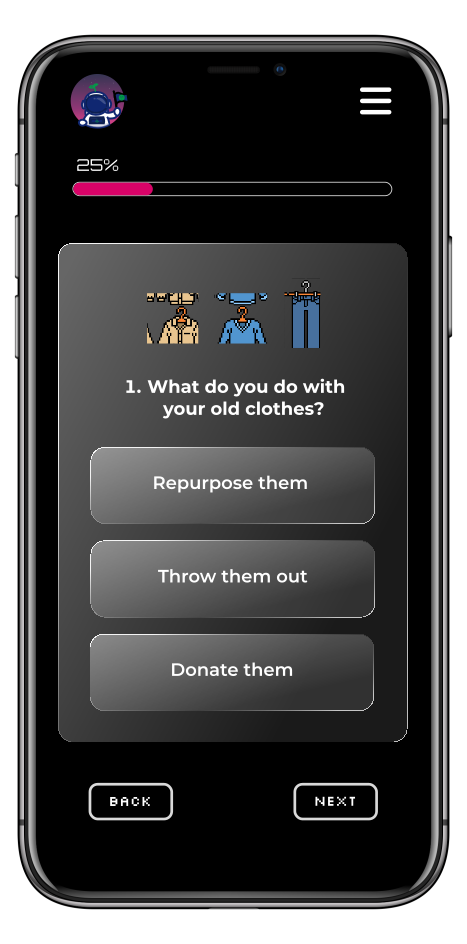
Presenting a fun app that educates users about sustainable practices through quizzes. It encourages reflection on recycling habits and provides personalized recommendations for greener choices. Built with nextjs and css.
Role
Collab with a front-end developer at BCIT to create a quiz webpage with our own json file that maps through it and grabbing the image for the question, question, and options that has the option, point, result, and outcome.
The Goal
The goal for Recyclonaut is to empower users with knowledge on recycling habits and sustainable choices through engaging quizzes and informative content, fostering active learning and reflection.
JSON File
1
2
3
4
5
6
7
8
9
10
11
12
13
14
15
16
17
18
19
20
21
22
23
24
25
26
27
28
29
30
31
32
33
34
35
[
    {
        // Question 1
        "questionID": 1,
        "img": [
            "quiz/jacket.png",
            "quiz/sweater.png",
            "quiz/jeans.png"
        ],
        "question": "What do you do with your old clothes?",
        "options": [
            {
                // Option 1
                "option": "Repurpose them",
                "point": 2,
                "result": "Great job! Repurposing is eco-friendly, creative, and reduces waste.",
                "outcome": "✓"
            },
            {
                // Option 2
                "option": "Throw them out",
                "point": 0,
                "result": "Not the best choice. Consider repurposing or donating them next time.",
                "outcome": "✗"
            },
            {
                // Option 3
                "option": "Donate them",
                "point": 1,
                "result": "Donating old clothes is good for the environment, but also consider repurposing them to give them a new life.",
                "outcome": "✓"
            }
        ]
    },
]
This JSON data represents a quiz with multiple-choice questions, each containing options with associated points, outcomes, and results.
Mapping the JSON File
1
2
3
4
5
6
7
8
9
10
11
12
13
14
15
16
17
18
19
20
21
22
23
24
25
26
27
28
29
30
31
32
33
34
<div className={styles.quiz_container}>
    {/* Container for the quiz */}
    <div>
        {/* Container for each question */}
        <div className={styles.img_container}>
            {/* Image container */}
            {Array.isArray(img) ? (
                // Render image if img is an array
                <>
                    {img.map((img, imgIndex) => (
                        <Image key={imgIndex} src={`/${img}`} width={60} height={70} />
                    ))}
                </>
            ) : (
                // Render single image if img is not an array
                <Image src={`/${img}`} width={160} height={110} />
            )}
        </div>
        <h4 className={styles.question}>{question}</h4>
        {/* Display options */}
        {options.map((option, index) => (
            <div key={index} onClick={() => handleOption(index)}>
                {/* Clickable option buttons */}
                <button
                    type="button"
                    className={`${index === activeOption ? styles.active : ''} ${styles.button}`}
                >
                    {option.option}
                </button>
            </div>
        ))}
    </div>
</div>
This code renders the question images, text, and clickable option buttons for the quiz. It handles both single and multiple images for each question and updates the state when an option is clicked.
State Declarations
1
2
3
4
5
6
7
8
9
10
11
12
13
14
15
16
17
18
// useRouter provides access to the Next.js router
    const router = useRouter();
    // State variables to manage quiz data
    const [question, setQuestion] = useState(""); // Current question
    const [options, setOptions] = useState([]); // Options for the current question
    const [questionIndex, setQuestionIndex] = useState(0); // Index of the current question
    const [points, setPoints] = useState([0, 0, 0, 0]); // Points accumulated for each question
    const [disable, setDisable] = useState(false); // Flag to disable option selection
    const { img } = quizdata[questionIndex]; // Image for the current question
    const [poor, setPoor] = useState(false); // Flag for poor result
    const [good, setGood] = useState(false); // Flag for good result
    const [great, setGreat] = useState(false); // Flag for great result
    const [summary, setSummary] = useState([]); // Summary of quiz results
    const [improve, setImprove] = useState([]); // Suggestions for improvement
    const isLastQuestion = questionIndex === quizdata.length - 1; // Flag to check if it's the last question
    const [isActive, setIsActive] = useState(false); // Flag for active state
    const [activeOption, setActiveOption] = useState(-1); // Index of the active option
These variables serve as the backbone of the quiz functionality, orchestrating the flow of information and interactions to deliver a seamless and satisfying user experience from start to finish.
Effect Hook
1
2
3
4
5
6
// Effect hook to update question and options when questionIndex changes
useEffect(() => {
   setQuestion(quizdata[questionIndex].question);
   setOptions(quizdata[questionIndex].options);
}, [questionIndex]);
This code is important because it makes sure that the right question and options are shown based on where the user is in the quiz. It helps the quiz feel smooth and responsive, so users always see the right content as they move through it, making the quiz easy to use and understand.
Option Selection Handler
1
2
3
4
5
6
7
8
9
// Function to handle option selection
const handleOption = (optionIndex) => {
    const updatedPoints = [...points];
    updatedPoints[questionIndex] = quizdata[questionIndex].options[optionIndex].point;
    setPoints(updatedPoints);
    setActiveOption(optionIndex); // Set the active option
    setDisable(true);
};
This function is called when a user selects an option in the quiz. It updates the points array based on the selected option's point value, sets the active option index, and disables further option selection until the next question.
Submission Handler
1
2
3
4
5
6
7
8
9
10
11
12
13
14
15
16
17
18
19
20
21
22
23
24
25
26
// Function to handle submission of quiz
const handleSubmit = () => {
    // Calculate total points
    const totalPoints = points.reduce((sum, point) => sum + point, 0);
    // Generate summary based on selected options
    const newSummary = quizdata.map((question, index) => {
        const optionIndex = question.options.findIndex(option => option.point === points[index]);
        return `${question.options[optionIndex].outcome} ${question.options[optionIndex].option}`;
    });
    setSummary(newSummary);
    // Generate improvement suggestions based on selected options
    const newImprove = quizdata.map((question, index) => {
        const optionIndex = question.options.findIndex(option => option.point === points[index]);
        return `${question.options[optionIndex].result}`;
    });
    setImprove(newImprove);
    // Determine the result category based on total points
    if (totalPoints === 6) {
        setGreat(true);
    } else if (totalPoints >= 3 && totalPoints <= 5) {
        setGood(true);
    } else if (totalPoints >= 0 && totalPoints <= 2) {
        setPoor(true);
    }
};
This function is called when the user submits the quiz. It calculates the total points, generates a summary and improvement suggestions based on the selected options, and sets the appropriate result category (great, good, or poor) based on the total points.
Challenges
- In this project, one of the tough parts was figuring out how to work with the `quiz.json` file because I was new to handling data in that format.
- O Another tricky aspect was creating a scoring system where users earn points based on their quiz answers. However, a problem came up when users wanted to go back to a previous question - the score wouldn't reset properly, which wasn't what we wanted.
Outcome
We have successfully achieved our goal of creating an interactive quiz webpage aimed at educating people about recycling habits and promoting sustainable choices. Through engaging questions and intuitive design, users are encouraged to learn and adopt eco-friendly practices in their daily lives.

